

Hello. Today, I have to announce another update. Currently we’re working on a small script language to implement special features to control textures, behaviors, models, geometry layout, etc. This scripting language is kept pretty simple and is extensible.
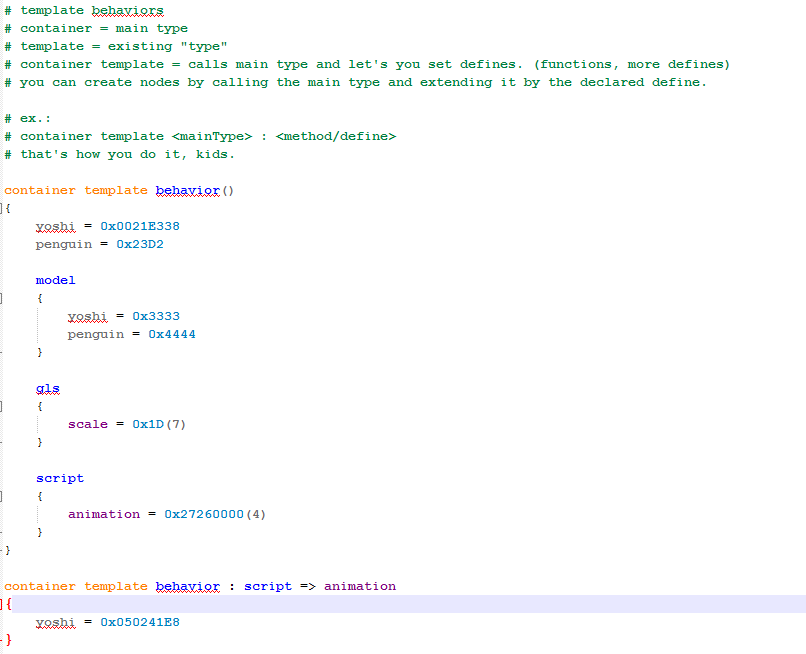
(The penguin behavior and models are incorrect, cause I was too lazy now to find the addresses)
As you can see, this is a kind of “library”. To explain shorty, a “container” is a call code for a main type. There’s no custom definition for main types, although I would offer a kind of another way for this. Template simply means an existing type. So, if I write “container template” I would call a main type and basically give it defines respectively variables. In these container templates you can also “inherit” other container templates and add defines for them. HOWEVER! This means that those variables are only available to the container template behavior!
Here’s an example of a practical usage of the container templates in a normal user made code:
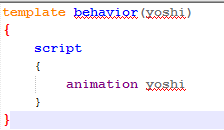
We wrote “template behavior”. That means we take an existing type, link it to Yoshi (which we defined as 0x0021E338, our yoshi behavior) and go into the script section and call the animation for yoshi. You now realized, that “yoshi” in behavior and yoshi after animation aren’t the same. Pretty cool, eh? Saves time and avoids remembering other names like “blahAnimation” “blahModel”.
As I said earlier, if I now would create a template script and use animation yoshi, it wouldn’t work, because we only defined it in container template behavior. In the first picture you see how we point our container template for script to the “animation” command. The brackets in animation “(4)” basically mean, the following values are not static but different, in this case the address for the animations. By pointing to animation we automatically specify those values. Now we set yoshi = 0x050241E8. So, if we write in template behavior animation yoshi, it would replace it with the whole animation command in (our case) yoshi behavior. Of course, we could use the pointing function, directly inside script. Like this:
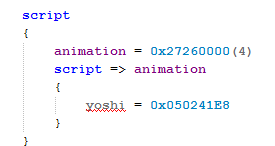
So, each to their own. Now, we move on to “materials” respectively textures. Let’s say you want to pass some special things (ofc, it could be done with the tools too) to them like ambient, color combiner (cc), etc. you can make use of the material template, but it isn’t really a template and more a type of it’s own, an actual file. The materials work a bit different than the other templates. For example, we won’t define new variables/defines, but make direct manipulations to the material which is later imported into the game.
Ex.:
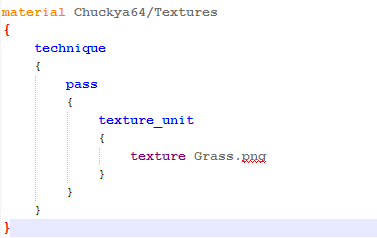
This here shows a simple material script. Basically, we first tell material which folder we access to, Textures folder. Then we call type technique, then call type pass and then type texture_unit. Basically the texture unit is everything related to the actual texture. There we tell texture_unit which texture should be passed. In this case it should look for Chuckya64/Textures/Grass.png and load it. You can also pass ambient and other stuff in the “pass” type. I will write, once Chuckya64 is in a proper state (which can take ’till next year), a documentation for this.
 Entries (RSS)
August 17th, 2015 at 2:47 am
Hello Tarek!
I have been following your project so far and this sounds really interesting. Although the syntax of the scripting language confuses me a bit.
What I am wondering is how is it implemented? Will you be able to click an object and it shows a menu where you can script the specific object?
And my most important question is: When can we expect a release? I hope you can answer. Thanks
August 17th, 2015 at 8:11 am
Hello, link. First off, the syntax isn’t really complicated. Maybe I didn’t explain it good enough, which is logical as it’s pretty much still work in progress and I didn’t have time to write a proper documentation.
To the rest, yes we aim to make the scripting part available for every object. Let’s say you select a goomba, it would auto-generate all the template scripts for behavior goomba, model goomba from the container template libraries. Of course, it will also load geometry layout scripts and other stuff. You then can start right away and code.
To the release thing I’ve pretty much said anything already. The release is coming once it’s done. We can’t make any exact dates because then we would make people get too excited for a specific date and then boom we find out that something went wrong and we can’t upload it and people are disappointed. So we prevent giving any specific details. However, my guesses are (if everything works right) that it will take ’till next year until the first beta of Chuckya64 can be released to the public. However, this is only my guess, my expectation. Of course, it could happen something different and it could take even longer.